
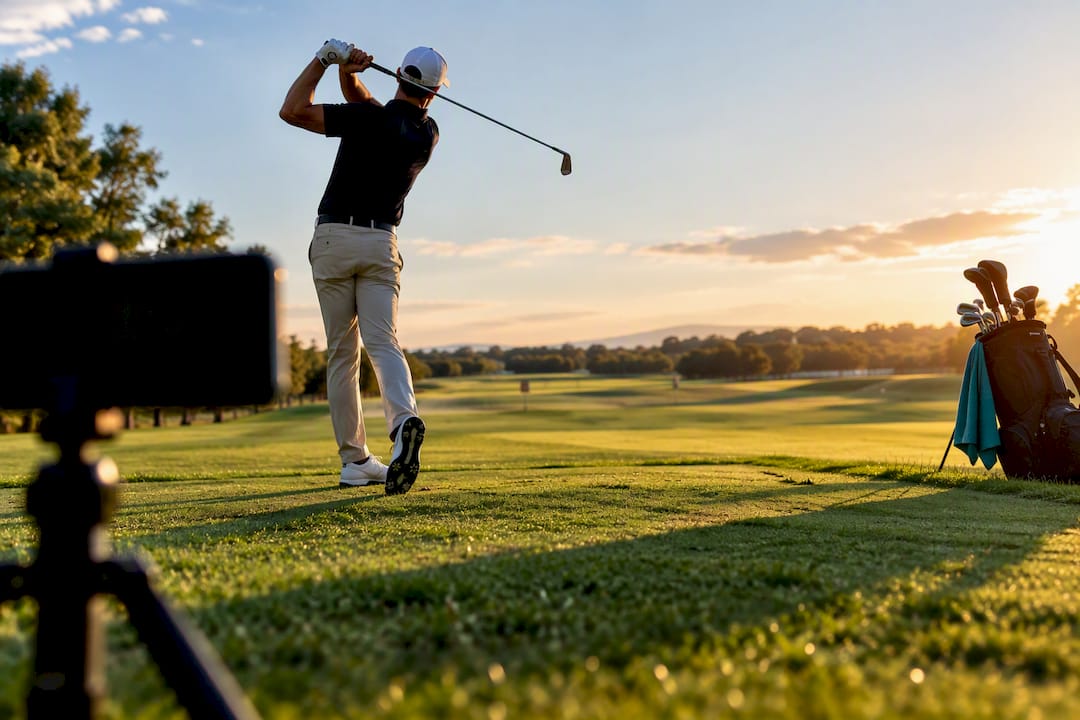
The quickest reliable setup is a small tripod placed down-the-line at hip height, eight to twelve feet from the ball, recording at 120 fps slow motion. A phone clamp on your bag or cart works nearly as well if you’re moving between holes. Third-party apps add polish, like automatic clip tagging or overlay lines, but they’re optional. The tripod and the angle are what actually matter.
TL;DR:
- Using a small tripod placed 8 to 12 feet behind the ball and recording at 120 fps provides the clearest, most useful slow-motion golf swing footage.
- The best camera angles for analysis are down-the-line to assess swing path and club plane, and face-on to evaluate balance and sequencing.
- Locking exposure, focus, horizon level, and framing before recording ensures professional-quality clips that are easy to analyze later.
- Phone mounts such as compact tripods or clamp mounts suited to your typical practice or course routine will prevent shaky footage and save setup time.
- Most effective analysis occurs when filming consistently, reviewing clips against proper reference points, and bringing footage to a professional for interpretation.
Table of Contents
- Best Phone Mounts for Filming a Golf Swing
- What Are the Best Camera Angles for Golf Swing Video?
- Which Phone Camera Settings Actually Matter?
- Which Apps Help You Analyze a Recorded Swing?
- Stabilizing Your Phone Without a Tripod
- A One-Minute Pre-Check Before You Hit Record
- How Golf Blab Helps You Turn Footage Into Real Improvement
- Should You Mute Audio or Capture Sound When Filming Your Swing?
- How Do You Keep Your Phone from Dying Mid-Session?
- What Actually Moves the Needle When You Film Your Swing
- Ready to Turn Your Swing Video Into Real Feedback?
- Sources
- FAQ
Best Phone Mounts for Filming a Golf Swing
The right mount depends on where you golf, not how much you want to spend. A weekend range warrior has different needs than someone who films every shot on the course, and buying the wrong gear leads to shaky, unusable footage no matter how good your phone’s camera is.
Compact tabletop tripods are the workhorse choice for most golfers. They’re small enough for a golf bag pocket, sturdy enough to survive wind on an open range, and cheap enough that losing one doesn’t sting. Look for adjustable legs so you can level the phone on uneven turf.

Flexible tripods (the GorillaPod style, with bendable legs) solve a problem tabletop models can’t: uneven ground. You can wrap the legs around a golf cart rail, a fence post, or a bag stand instead of relying on flat ground that rarely exists on a range or fairway.
Monopods and selfie sticks trade stability for reach. They’re useful for grabbing a quick face-on angle from a distance you couldn’t otherwise reach, but they wobble in wind and aren’t built for hands-free recording, so they’re better as a backup than a primary mount.
Clamps and phone clips attach directly to a cart rail, fence, or umbrella stand. These are the best option for golfers who film every round rather than dedicated practice sessions, since you’re not carrying or setting up separate gear.
Golf-specific bag and cart mounts are purpose-built for this exact job. They usually include a rotating head so you can switch between down-the-line and face-on without repositioning the whole rig.
Spike or stake mounts push into turf and give you a fixed point at ground level, which some instructors prefer for capturing ball position and lower body movement.
Buying guidance breaks down simply:
- Mostly practice at the range? A compact tripod covers you completely and stores flat in your bag.
- Film mostly on-course? A clamp or golf-specific cart mount saves setup time between shots.
- Only film occasionally? Skip the purchase. Field hacks (covered below) work fine for infrequent use.
- Want one mount for everything? A flexible tripod adapts to nearly any surface, which makes it the most versatile single purchase.
Before buying, check the mount’s clamp width against your phone. Wider phones and thick protective cases can jam narrower clamps, and most cheap mounts max out around 3.5 inches. A quick-release plate is worth the extra few dollars if you plan to swap the phone on and off often, since twisting a screw mount on and off every hole gets old fast.
What Are the Best Camera Angles for Golf Swing Video?
Two angles cover nearly everything a coach or a self-analysis app needs to see, and instructors generally ask for both rather than picking one.
Down-the-line places the camera directly behind the ball, aimed straight down the target line. This angle reveals swing plane, club path, and how far the club drifts inside or outside on the backswing, details that are nearly invisible from any other position.
Face-on places the camera directly in front of you, perpendicular to the target line. This angle shows spine tilt, weight shift, and head movement, the pieces that matter most for balance and sequencing.
Here’s how to set up both quickly:
- Down-the-line first. Place the tripod about 8 to 12 feet behind the ball, with the lens roughly waist height. Frame the shot so your full body and the clubhead are visible at the top of the backswing, with a little headroom above your hands.
- Face-on second. Move the tripod to a spot even with the ball, 8 to 12 feet away, lens between waist and chest height depending on your own height. Center the frame so you’re not clipped on either side during full extension.
- Check the grid before either swing. Turn on your phone’s grid lines and align the horizon with a horizontal line, and align your body’s centerline with a vertical one. A tilted horizon makes swing-plane analysis unreliable even when everything else is right.
- Take one test swing and scrub through it. Confirm the clubhead never leaves the frame at the top of the backswing or through impact. This is the single most common framing mistake, and it ruins otherwise good footage.
If you only have time for one angle, coaches still generally want to see both, so a 30-second reset to grab the second view is worth the extra minute. Recreational golfers often default to face-on because it “looks” like the swing, but down-the-line is usually the more diagnostic angle for club path issues.
Which Phone Camera Settings Actually Matter?
Frame rate is the setting that determines whether your footage is actually analyzable or just a blurry approximation of your swing. 120 fps is the practical sweet spot for most modern phones, giving you enough slow-motion detail to see impact clearly without the massive file sizes that come with higher rates.
Pro Tip: If your phone supports 240 fps, save it for isolated impact review rather than full swings. The extra detail is nice, but the file sizes add up fast, and 120 fps captures everything most self-analysis needs.
Beyond frame rate, a short list of settings separates usable footage from wasted footage:
- Shoot in landscape orientation, always. Vertical video crops out exactly the parts of your swing a coach needs to see.
- Lock exposure and focus (AE/AF Lock) before you swing. Without it, the camera will hunt for focus mid-swing as lighting shifts, softening the exact frames that matter most.
- Turn on grid lines for level framing and consistent camera placement across sessions.
- Avoid digital zoom. Move the tripod closer instead. Digital zoom degrades footage quality precisely when you need clarity most.
- Disable HDR for swing recording. HDR processing can introduce a slight lag between frames that muddies slow-motion playback.
- Save clips as .mp4 or .mov, whichever your phone defaults to; both are compatible with essentially every swing analysis app.
Regular-speed video is fine for quick sharing with a buddy or posting online, but slow motion is what makes frame-by-frame analysis possible. If storage space is tight, delete swings you’ve already reviewed rather than downgrading your frame rate. A few gigabytes of swing clips is a small price for footage you can actually use.
Which Apps Help You Analyze a Recorded Swing?
Not every golf app does the same job, and picking the wrong type wastes the good footage you just captured. Four categories cover most of what’s available.
Instant slow-motion recorders simply capture and immediately replay your swing in slow motion, no analysis layer involved. Apps like Golf Swing Cam fall into this group, offering fast replay and basic editing without much complexity.
Automatic swing detectors watch continuously and clip each strike on their own, which matters if you’re filming solo at the range and don’t want to run back and forth to press record. GolfRec and similar apps advertise this feature, though device compatibility requirements can be strict, so check your phone’s model and iOS version before relying on it.
AI analysis platforms go a step further, offering frame-by-frame feedback pulled directly from your video. Tools like SwingSnap position themselves as an always-available coach for practice sessions between lessons.
Frame-by-frame editors let you manually scrub, pause, and draw over your own footage, which suits golfers who already know what they’re looking for and just need the tools to isolate it.
When comparing apps, prioritize:
- Automatic clip saving so you’re not manually trimming every swing
- Pause and replay at specific frames, especially impact
- Drawing overlays for swing plane or spine angle
- Side-by-side comparison against a pro swing or your own past clips
- Sharing or streaming options if you’re sending clips to a coach
Pricing ranges from free with ads to subscription models and one-time unlocks for advanced features. Test the free tier before paying, since basic recording and replay covers most golfers’ actual needs.
Stabilizing Your Phone Without a Tripod
Not every session calls for hauling a tripod, and a surprising number of usable clips come from gear you already have in your bag.
Wedging your phone into a bag divider at the right angle creates a surprisingly stable base, especially for a quick down-the-line check between range balls. A folded towel or headcover under the phone adds extra grip and levels out an uneven surface. Clamping the phone to a cart rail or a nearby fence rail works well on the course, where you’re moving hole to hole and don’t want to fuss with tripod legs. An alignment stick clipped to a cheap phone clamp is another field-tested trick, letting you push one end into the turf like a stake.
A few habits matter regardless of which hack you use:
- Check the horizon against the grid lines before every swing, not just the first one
- Keep the phone as far from the swing path as your framing allows, reducing vibration from footsteps or club contact
- Recheck the mount after every few swings; clamps loosen and towels shift
Pro Tip: A hack is fine for occasional range sessions, but if you film every round or every practice day, the twenty minutes you’ll save over a season by owning a real tripod pays for itself.
A One-Minute Pre-Check Before You Hit Record
Run this before every session, not just the first swing of the day:
- Stability check. Give the mount a light tap. If it wobbles, fix it before recording.
- Orientation check. Confirm landscape mode.
- Framing check. Full body and clubhead visible at the top of the backswing.
- Exposure and focus locked. Tap and hold on your body to lock AE/AF.
- Frame rate set. 120 fps for most sessions, 240 fps only if you’re isolating impact.
- Test swing and scrub review. Take one practice swing, then check the top-of-backswing frame for clipping.
Name and save clips by date and angle (like “0912_DTL” and “0912_FO”) so you can compare sessions later without scrolling through dozens of identically named videos. Common problems are easy to fix once you know to look for them: sun behind the camera washes out the golfer, a tilted horizon throws off plane analysis, and a frame that’s too tight clips the clubhead at the exact moment it matters most.
How Golf Blab Helps You Turn Footage Into Real Improvement
Filming a swing is only half the job. The harder part is knowing what you’re actually looking at once the clip is saved, and that’s where most self-taught analysis stalls out. Golf Blab’s educational library breaks down the full golf swing sequence step by step, giving you a reference point for comparing your own down-the-line footage against proper sequencing.
The value of filming in the first place is well established. Recording your swing consistently turns vague feelings about your swing into footage you can actually measure against yourself over time, and video analysis more broadly has become one of the more accessible tools available to golfers who can’t get to a coach every week.
Author Michael Marini covers this ground from the practical side: gear that works, angles that reveal something useful, and settings that don’t sabotage good footage before it even reaches an app. Partnerships with professional golfers reflect the same instructional focus that shapes this kind of guidance.
Once you’ve got clips worth studying, Play Golf with a Tour Pro gives you a direct next step: bring your footage to someone qualified to interpret it rather than guessing alone.
Should You Mute Audio or Capture Sound When Filming Your Swing?
Audio rarely matters for swing analysis, and it can actually work against you. Wind noise, cart chatter, and course announcements clutter the track and add nothing to what a coach or an app needs to evaluate. Muting your phone’s microphone before recording, or simply ignoring the audio track entirely during review, keeps your focus on the visual mechanics where it belongs.
There’s one exception worth knowing. Impact sound, the distinct crack or click of contact, can help you time your review scrubbing even without watching closely. Some golfers use that sound cue to quickly locate the impact frame when reviewing a long session of clips, rather than scrubbing through video by eye. If you plan to use audio this way, keep the microphone on but don’t rely on verbal notes during the swing itself. Talking while swinging is a distraction for you and adds nothing useful to the file.
If you’re sharing clips with a coach or posting to a group chat for feedback, muting the final file is usually the cleaner choice. Wind and background noise on a course carry surprisingly well on phone microphones, and stripping the audio makes for a cleaner, more professional-looking clip without changing anything about the swing analysis itself. Most video editing apps let you mute a clip in a single tap after recording, so there’s no need to think about it in the moment.
How Do You Keep Your Phone from Dying Mid-Session?
A dead phone halfway through a range session is one of the more avoidable frustrations in golf. Slow-motion video at 120 fps drains battery faster than nearly anything else your phone does, combining sustained camera use with intensive processing.
A few habits stretch a charge considerably further. Lower your screen brightness before you start recording, since the display is often a bigger drain than the camera sensor itself. Close background apps, especially anything using GPS or streaming data, before you head to the range. Turn on low-power or battery-saver mode between swings if your phone supports quick toggling, and switch it off only when you’re actively recording.
For longer sessions, a compact power bank in your bag solves the problem outright. A small 5,000 to 10,000 mAh battery pack, the kind that fits easily in a side pocket, can fully recharge most phones once or twice over and weighs less than a sleeve of golf balls. Look for one with a USB-C or Lightning cable already attached, since fumbling for a separate cord between shots defeats the convenience.
If you’re filming an entire round rather than a single practice session, consider recording only test swings at the range and saving full battery for a handful of key holes on course. Filming every single swing for eighteen holes at 120 fps will strain even a phone at full charge by the back nine, and you rarely need that much footage anyway. A handful of well-framed swings beats fifty unreviewed ones.
What Actually Moves the Needle When You Film Your Swing
Most advice on this topic obsesses over gear, and that’s backwards. A $15 tabletop tripod and a phone from three years ago will produce perfectly analyzable footage if the angle, distance, and settings are right. The gear conversation gets outsized attention because it’s easy to shop for and hard to get wrong, while the actual skill, framing a swing so the clubhead never leaves the shot and the horizon stays level, gets skipped entirely.
The bigger gap is what happens after the recording stops. Golfers film dozens of swings and rarely study any of them against a real reference point, which turns a genuinely useful habit into a pile of unwatched clips. Footage without structure is just video. The reader who benefits most isn’t the one with the fanciest mount; it’s the one who reviews consistently, compares against a real sequence, and eventually brings the footage to someone who can read it properly.
Prioritize the one-minute pre-check over any specific piece of gear. Consistency in framing beats a nicer tripod every time.
— Michael Marini
Ready to Turn Your Swing Video Into Real Feedback?
A good tripod and the right camera settings get you analyzable footage. What most golfers are missing isn’t more clips, it’s someone qualified to actually read them. Play Golf with a Tour Pro gives you exactly that for a session: a direct opportunity where your filmed swing gets real, expert eyes on it instead of another round of guessing alone.
If you’re building your setup at the same time, Golf Blab’s shop covers the practical side too, from personalized club labels to gear that makes practice feel like it belongs to you. Shopping for a golfer who films every round? E-gift cards at $25 one-off cover lessons or merchandise without guessing sizes or preferences.
Record your next session, study it against a real reference, and book your tour pro session while the swing is still fresh in your mind.
Sources
- How to Film Your Golf Swing on Your Phone (Best Angles & Tips) | SnapCard
- How to Video Your Golf Swing with an iPhone | CaddieHQ
- Golf Swing Cam: Slow Motion — App Store
FAQ
What Is the Best Phone Holder for Filming Golf Swings?
A compact tabletop tripod is a versatile and practical choice for many golfers, being portable, stable, and affordable enough to keep in a bag pocket permanently. If you film on-course rather than at the range, a clamp mount for a cart rail or fence saves setup time between holes.
How Do I Film My Golf Swing Using Only My Phone?
Set your phone to landscape orientation, lock exposure and focus, and turn on grid lines for level framing. Place it down-the-line, 8 to 12 feet behind the ball at hip height, and record at 120 fps for footage detailed enough to review frame by frame.
What Is the Best App for Filming Golf Swings?
It depends on what you need: instant slow-motion apps like Golf Swing Cam suit quick replay, while automatic detectors like GolfRec work well for solo range sessions. Check device compatibility before committing to an automatic-detection app, since requirements vary by phone model.
What Is the Best Camera to Record Golf Swings?
You don’t need a dedicated camera. Modern phone cameras are more than adequate for coaching-level analysis when paired with a stable mount and the right settings, and phone slow-motion at 120 fps captures the detail most golfers and coaches actually need.
Do I Need Two Camera Angles or Just One?
Down-the-line and face-on each reveal different mechanics, and coaches typically want to see both. If you only have time for one, down-the-line usually offers more diagnostic value for swing path issues, but grabbing a quick face-on clip afterward takes less than a minute.